Emails are the most common medium of communication among home as well as business users in these days. Therefore, to make the use of emails to communicate, users can utilize any email application as per their requirement. It is much clear that mail client will try to improve their standard and requirement for users to the next level. With increasing latest technology, many challenges may face when users want to export Yahoo mail to Office 365 account. Due to certain reasons, Yahoo Mail does not match the needs of the user in a proper manner. Thus, the question arises that how to migrate Yahoo email to Office 365? However, if users will take its small business to next level then, it is really important to have a suitable application that provides the professional environment to individuals. Therefore, users must switch to MS Office 365 from Yahoo mail in an efficient way. In the upcoming section, we are going to discuss various techniques to migrate Yahoo to Office 365 suite.
Manually Exporting Yahoo Mail to Office 365
As we know, migration between email client has become a trend among frequent users. One thing that users must keep in mind that there is no any direct solution available to move Yahoo to Office 365. Therefore, initially, users may migrate Yahoo Mail to Office 365 and after this, they can forward Yahoo mail to Office 365 profile.
1. Forward Yahoo Bussiness Mail to Office 365
In order to migrate from Yahoo email to Office 365, users have to follow the steps given below:
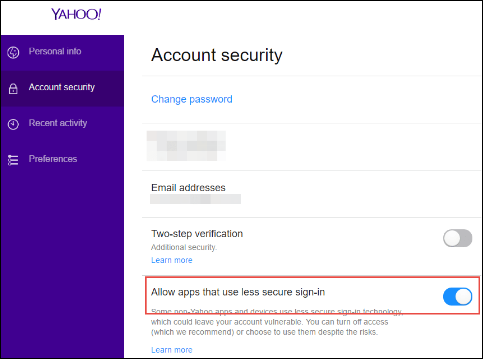
1. First of all, change the Account Security of Yahoo Email, and click on the Allow apps that use less secure sign-in option
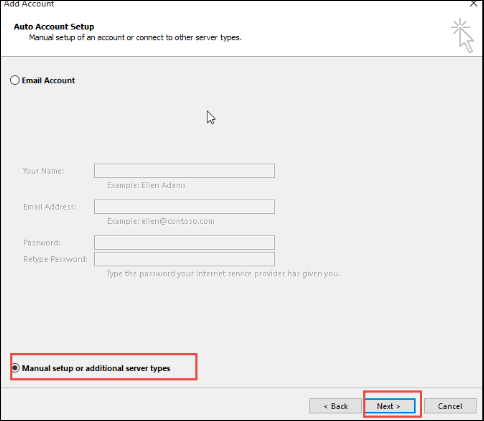
2. Then, open MS Outlook application, go to File menu and click on Info. Next, select Add Account option and choose Manually Configure Server Settings. Now, Click the Next to proceed further
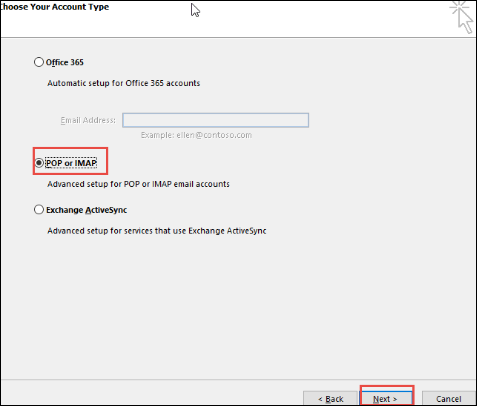
3. After that, choose the POP3 or IMAP from the Add New Account screen and press on Next button
4. Here, type all credentials i.e. Yahoo mail address and password. If users do not want to be prompted every time they login, must check the Remember Password box
5. Now, enter pop.mail.yahoo.com in the incoming mail server and type smtp.mail.yahoo.com in the outgoing server field
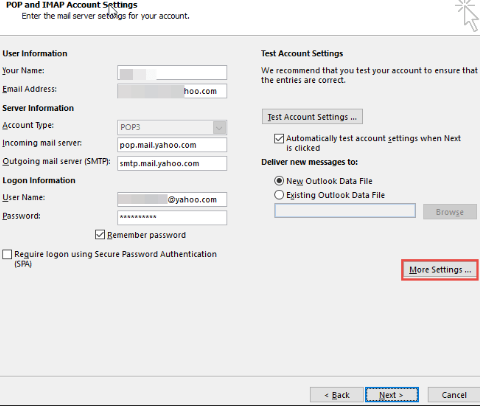
6. Now then, select the More Settings and under POP and IMAP Account Settings, type a name for an account
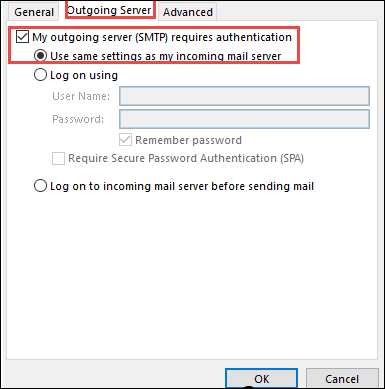
7. Choosing the Outgoing Server tab and click on Use Same Settings as My Incoming Mail Server option and My SMTP Requires Authentication
8. Open the Advanced tab and for POP3 server, enter the 995 and for SMTP server, type the value is 465. choose the SSL as the encryption type click on the option This Server Requires an Encrypted Connection
9. Now, Choose the OK and press Next button and then, click on the Finish option. After this, Exit and Restart Outlook application
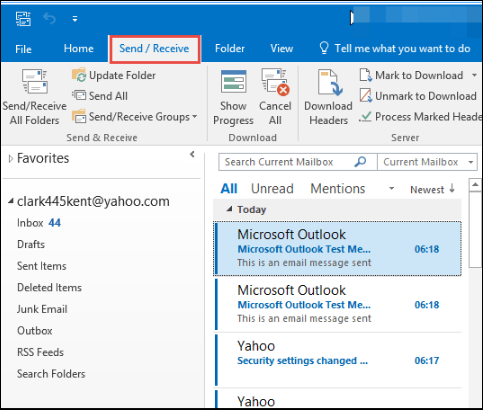
10. In last, click on the Send/Receive option and select Send/Receive All Folders option. All Yahoo folders are present in MS Outlook
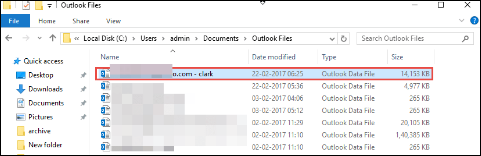
11. Now, go to the default location just for the confirmation that the exported Yahoo file to be saved or not.
2. Import Exported Yahoo Mail to Office 365 Account
To transfer resultant Outlook data file (.pst) to Office 365 profile, one can freely choose any of the solutions as stated below:
Solution 1: Use Network Upload Method
1. To begin the complete process, copy the SAS URL and install Azure AzCopy on the local machine
2. After that, upload multiple files to Office 365 account
4. Then, users have to view the uploaded files to continue the whole process
5. Next, creating a new import mapping data file
6. In last, users can easily create the import job in Microsoft Office 365
Solution 2: Use Drive Shipping Method
1. Copy the required file in a BitLocker-encrypted hard drive
2. Then, move the hard disk to Microsoft physically
3. After getting the disk, the personnel data start to upload the received Outlook data to the specific location, which is temporary within the cloud of Microsoft
4. Now, users can take help of MS Office 365 Import service to import exported Yahoo mail to Office 365 suite
Why Manual Approach Fails?
It might be possible that users become fail to import Yahoo Email to Office 365 account by using manual procedure those are described below:
- The procedure is too lengthy and complex to perform the migration for the novice users. So, it is time-consuming and users may need to take help of a technical expert as well.
- There may be a risk of data loss because it is not a guaranteed to find the solution.
Wisest Solution to Migrate Yahoo to Office 365 Account
As described above, there is no direct way available to export Yahoo Mail to Office 365 account. Thus, to have a reliable and commendable solution and to overcome all the drawbacks of the manual process, one can go for the trusted third party utility to export yahoo mail to PST file & then move PST to Office 365 in an easy way.
Wrapping it Up
In an era of Cloud solutions, Office 365 is a best Web-based application that plays an important role for professional purpose. Along with, we have explained different solutions that help to migrate Yahoo Mail to Office 365 account. As manual approach has some limitations so, we have suggested automated solutions i.e. Yahoo backup and PST to Office 365 Migration Tool that is capable of migrating Yahoo Bussiness mail to Office 365.